

How to Build a Trading Bot Without Coding on Switch Markets
One of the first things a trader gets to realize is that although trading is exciting, it’s also a grind. Watching charts all day? Not ideal, especially if you’re juggling a 9-to-5, family, or, let’s be honest, just trying to live your life. That’s where AI trading bots come in. AI trading bots offer many advantages, such as increased efficiency, speed, accuracy, and 24/7 operation. Best of all, now you can build one without writing a single line of code.
Now, it's not just a tool for large investment banks, hedge funds, and programmers; anyone can automate their trading, and quite easily.
In this article, you’ll learn how to automate your trading strategies in just a few clicks with Switch Markets’ new tool AlgoBuilder. Oh, and did we mention it’s free?
Let’s go to it.
What is an AI Trading Bot?
An AI trading bot is basically a software program that executes trades automatically based on a predefined strategy.
The “AI” part means it uses artificial intelligence, machine learning, and smart algorithms either to create the trading bot, analyze the market, or recognize patterns.
These bots can work on various financial markets, including forex, stocks, indices, crypto, and commodities. Depending on how advanced the algorithm is, some bots can even take in fundamental data or market sentiment from the news and adjust their behavior accordingly. However, most AI trading bots analyze economic technical indicators, different timings, chart patterns, and spreads between different markets or instruments.
Think of it like this: instead of manually clicking “buy” or “sell” every time you see a setup, the bot does it for you. 24/7. No emotions. No second-guessing. It just executes trades based on algorithmic trading strategies. And because bots don’t get tired, distracted, or stressed, they can maintain consistency over time, which is something many human traders struggle with. From this point on, all you have to do is to come up with a profitable strategy, backtest it, and then apply it in the live markets.
How Does an AI Algorithmic Trading Bot Work?
A trading bot connects to your brokerage account and follows a set of rules to trade automatically. These rules can be as simple as “buy when the RSI drops below 30” or more complex, involving moving averages, price action patterns, or even news-based triggers.
Here’s a quick breakdown:
- Market Scanning: The bot constantly scans the market for your chosen conditions.
- Signal Generation: When it finds a match, it triggers a buy/sell signal.
- Trade Execution: It places the trade instantly based on your preset risk settings, incorporating risk management techniques such as stop-loss orders and position sizing.
- Monitoring & Exiting: It can monitor trades, set stop-losses, take profits, and even trail stops—completely hands-free.
As mentioned earlier, some bots even evolve using AI, meaning they can “learn” what works and improve their trading performance over time.
Others include features like sentiment analysis or pattern recognition using real-time market data. With the right setup, a bot can adapt to different market environments, ranging from trend following during strong directional moves to mean reversion in ranging conditions. One thing that is highly recommended is to use a VPS, which ensures that your connection is protected and safe, market execution is much faster, and you can significantly reduce price slippage.
How to Get an AI Trading Bot?
At Switch Markets, we have launched a feature called Algo Builder, and we’re giving it away for free to anyone who opens a trading account and deposits just $50. That’s it. No hidden fees. No monthly charges. Just a super powerful AI trading bot builder in your hands, even if you’ve never coded a thing in your life.
Here’s what you need to do:
- Go to Switch Markets and open an account.
- Deposit $50 or more to activate your access.
- Start using the Algo Builder—no software installs, no setup headaches.
Once your exchange account is funded, you’ll find the Algo Builder right inside the dashboard. Click, build, test, go. Easy. And the best part? You’re not locked into a particular strategy. You can build multiple bots, test different timeframes, and refine your setups—all in one place.
This kind of access to smart automation has traditionally been reserved for hedge funds or experienced coders. Now it’s in your hands.
How to Create a Trading Bot Without Coding on Switch Markets
We've come to the heart of this article: how to build your own custom trading bot without writing a single line of code. AlgoBuilder has recently been rebuilt into a single, chat-driven workspace, so the process is now faster, more conversational, and more thorough than before. Here's an overview of how the whole process looks:
- Describe your strategy in plain English
- Let AlgoBuilder generate and explain the code
- Backtest your strategy directly inside the chat
- Optimize your parameters with the Strategy Optimizer
- Validate the optimized strategy with a fresh backtest
- Deploy your trading bot to MetaTrader 5
Now, let's walk through each step in detail.
Step 1: Describe Your Strategy
AlgoBuilder opens to a single screen with one question: "What strategy would you like to build today?" There's no need to fill in separate forms or configure settings first. Just describe your trading idea in plain English, including the market, timeframe, and any risk parameters you already have in mind, and AlgoBuilder generates, backtests, and optimizes it for you.
A short, specific prompt works best. Naming the instrument, the holding period, and your risk tolerance up front, for example, "a scalping strategy for EUR/USD, ten days, with a risk-reward ratio of 1%", gives AlgoBuilder enough to build a working first draft without asking follow-up questions.
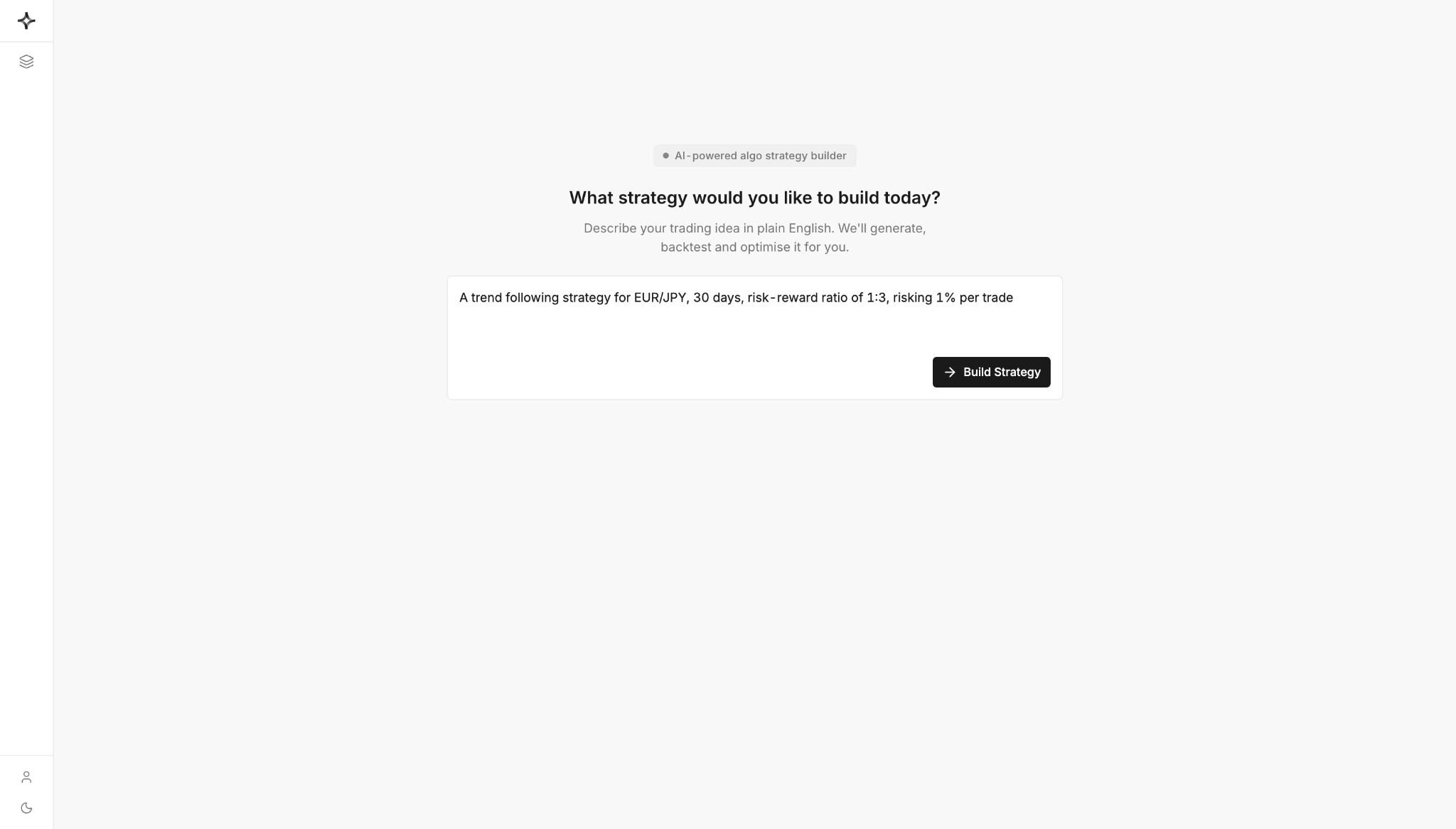
Once you have described your strategy, click "Build Strategy" and let the system take over.
If you find you can't put your strategy into words, it's likely discretionary rather than mechanical. A trading bot can only execute rules; it can't use judgment the way you can. Before moving on, tighten your strategy until every decision follows a clear, repeatable rule.
Step 2: Let AlgoBuilder Generate and Explain the Code
After you click "Build Strategy," you land in AlgoBuilder's main workspace: a Visual Backtester on the left and a live Chat panel on the right, with Build and Deploy modes at the top.
The chat panel tracks its own progress as it writes your strategy (“Generating Trading Code”), then explains, in plain English, exactly what it built: the entry logic, the indicators used, the stop-loss and take-profit rules, and the position-sizing method. It states its assumptions clearly, so if it has filled in a detail you didn't specify, such as which timeframe to trade on or how wide to set the stop, you can see that decision immediately rather than discovering it later in the code.
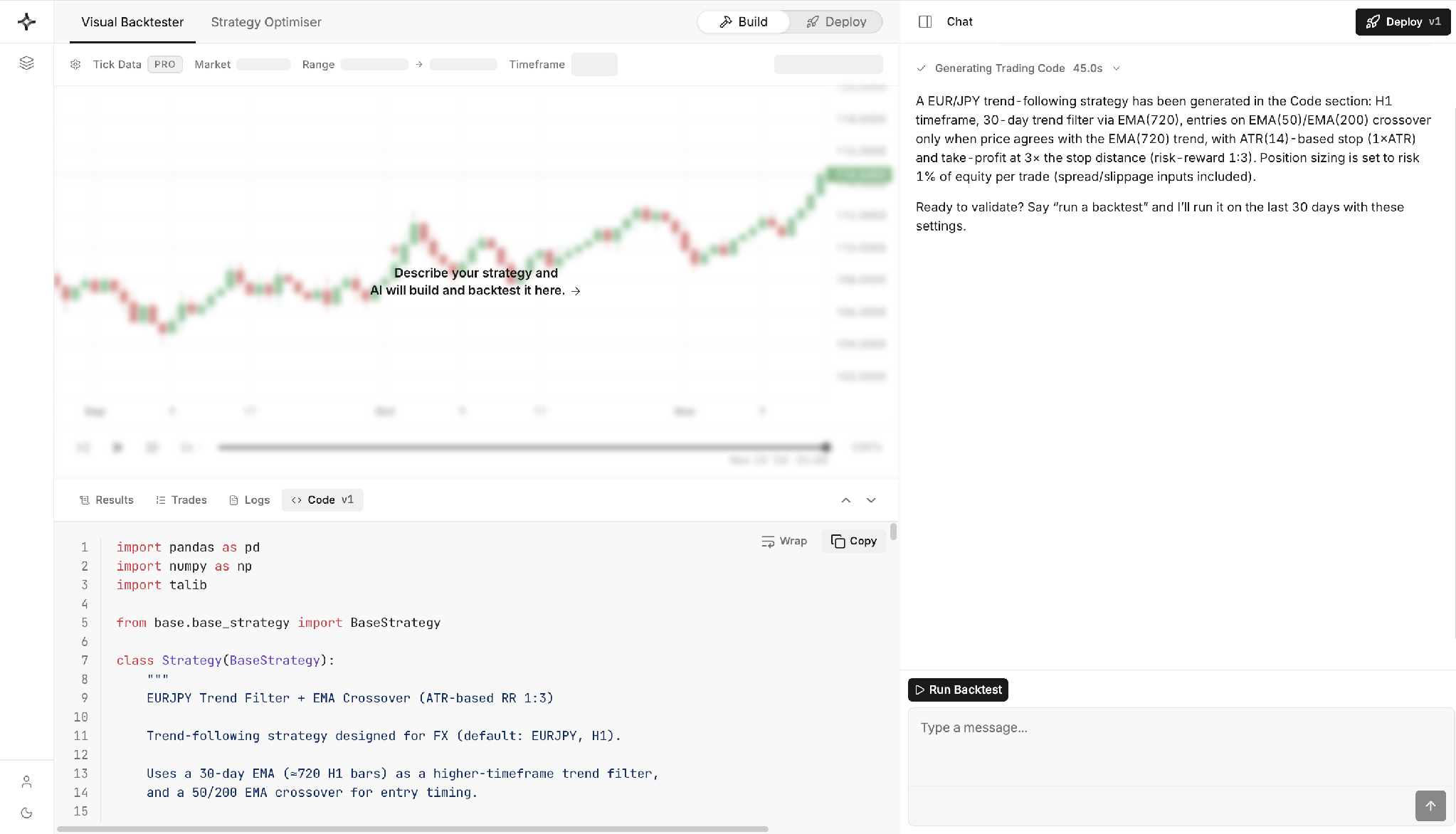
The finished Python code sits in the Code tab beneath the chart, so if you're comfortable reading code, you can review exactly how your strategy was implemented. If you're not, that's fine too. Once the code is ready, the chat asks whether you're ready to validate it and invites you to run a backtest.
Step 3: Backtest Your Strategy Through the Chat
Instead of switching to a separate backtesting page, you validate your strategy inside the same conversation. Click on "Run Backtest," and AlgoBuilder runs it over its default window.
AlgoBuilder replays your strategy candle by candle on the chart, using playback controls (play, pause, and adjustable speed) so you can watch your bot trade through history.
Once the run finishes, the chat reports the results in plain English: total return, win rate, profit factor, Sharpe ratio, and maximum drawdown. Crucially, it doesn't just report the numbers; it interprets them. It will point out, for example, that a strategy's drawdown looks large relative to its loss, or that short trades performed far better than long trades, and it uses that read to recommend a concrete next step.
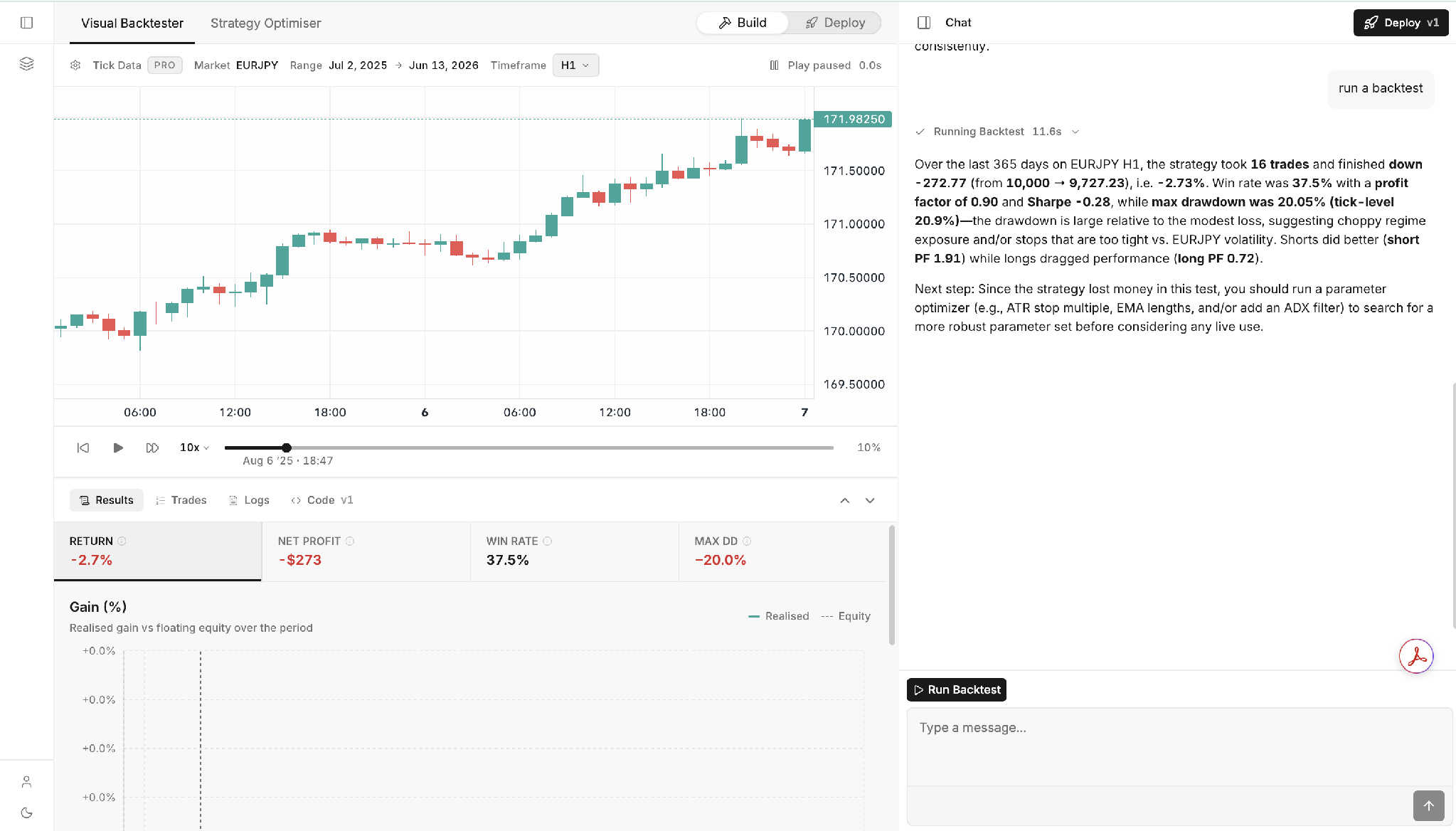
The same figures appear as tiles above a Gain (%) chart in the Results tab, plotting your realized return against floating equity over the period, so you can see exactly where and how the strategy gained or lost ground.
If the results disappoint, don't be discouraged. A losing backtest is useful information; it stops you from risking real money on a strategy that doesn't hold up, and it points you straight at the next step: optimization.
Step 4: Optimize With the Strategy Optimizer
When the chat flags a weak result, switch to the Strategy Optimizer tab next to Visual Backtester. Tell it which parameters to vary, such as your EMA lengths, ATR stop multiple, or trend filter, and AlgoBuilder tests a wide range of combinations automatically and ranks them by whichever metric matters most to you, such as Sharpe ratio.
The results come back as a ranked table showing return, Sharpe ratio, profit factor, maximum drawdown, win rate, trade count, and ending balance for each configuration. The chat then reads the table for you: it identifies which parameter ranges cluster among the top performers, such as a longer trend filter or wider stops, and explains why that pattern likely helped.
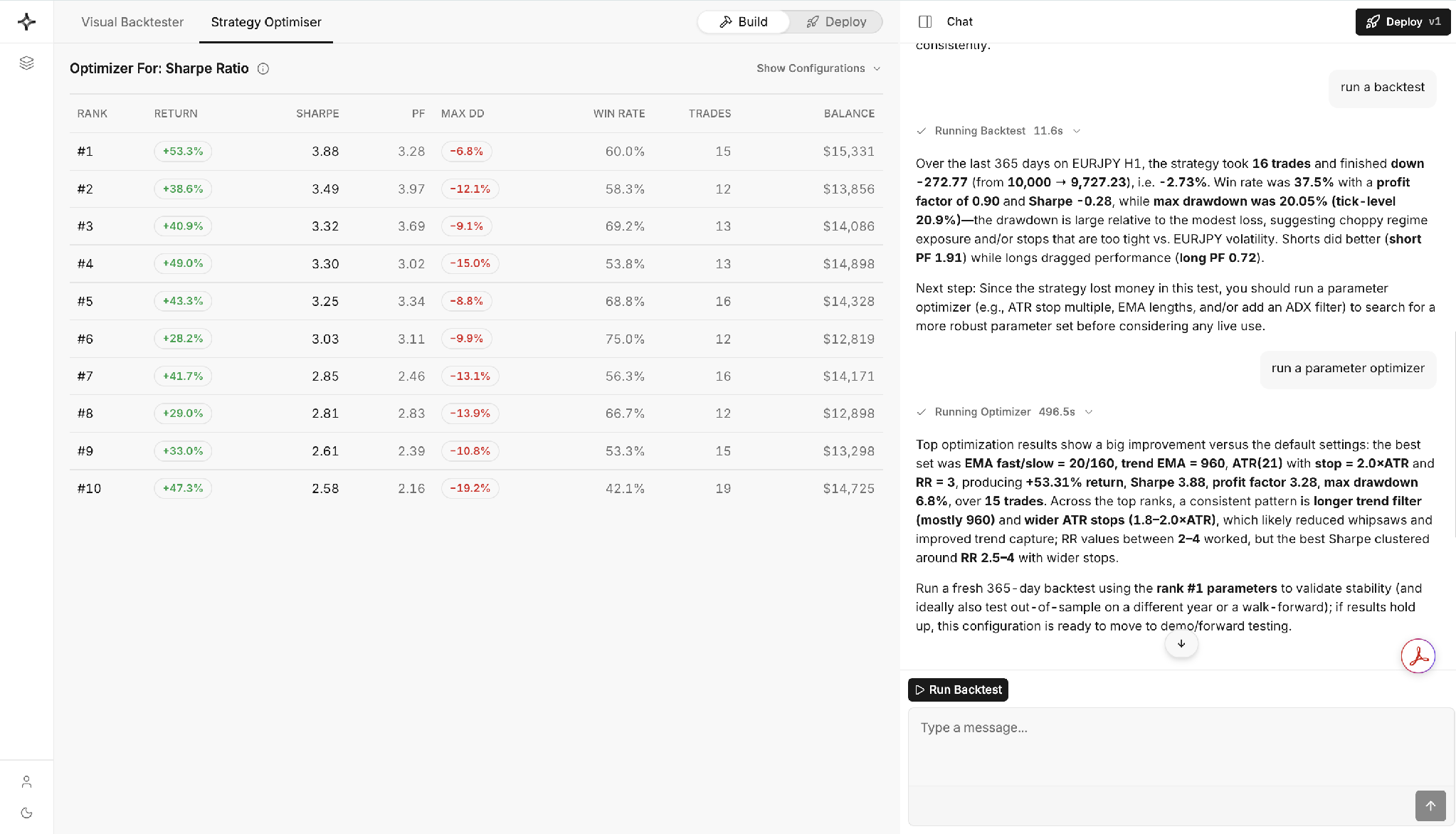
Treat this as an iterative conversation rather than a one-off. The optimizer searches the space you give it, but it's still your job to judge whether the winning combination makes sense, or whether it has simply been fitted to noise in the test window.
Step 5: Validate the Optimized Strategy With a Fresh Backtest
A strong optimizer result is a starting point, not a finish line. Ask the chat to run a fresh backtest using the top-ranked parameters, ideally over a longer period than the optimization window, to confirm the improvement holds up outside the exact conditions it was tuned on.
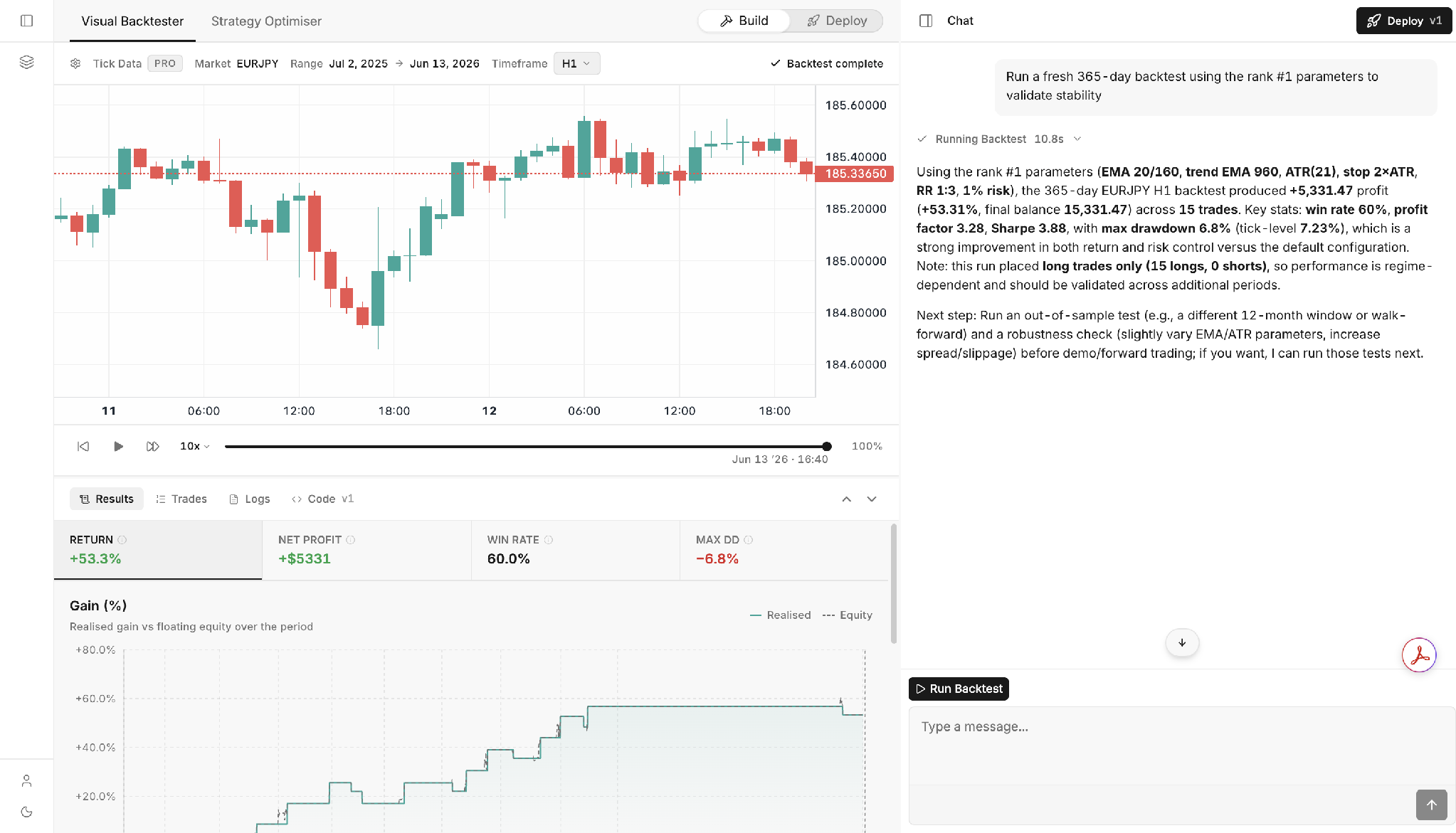
Read the chat's validation notes closely. It will surface caveats you might otherwise miss. When it does, follow its recommendation before you trust the result with real capital.
Step 6: Deploy Your Trading Bot to MetaTrader 5
Once you're satisfied with your strategy's performance across both the optimization and validation runs, switch from Build to Deploy at the top of the workspace. This opens your Deployed Strategies dashboard, where every strategy you deploy is saved and ready to run.
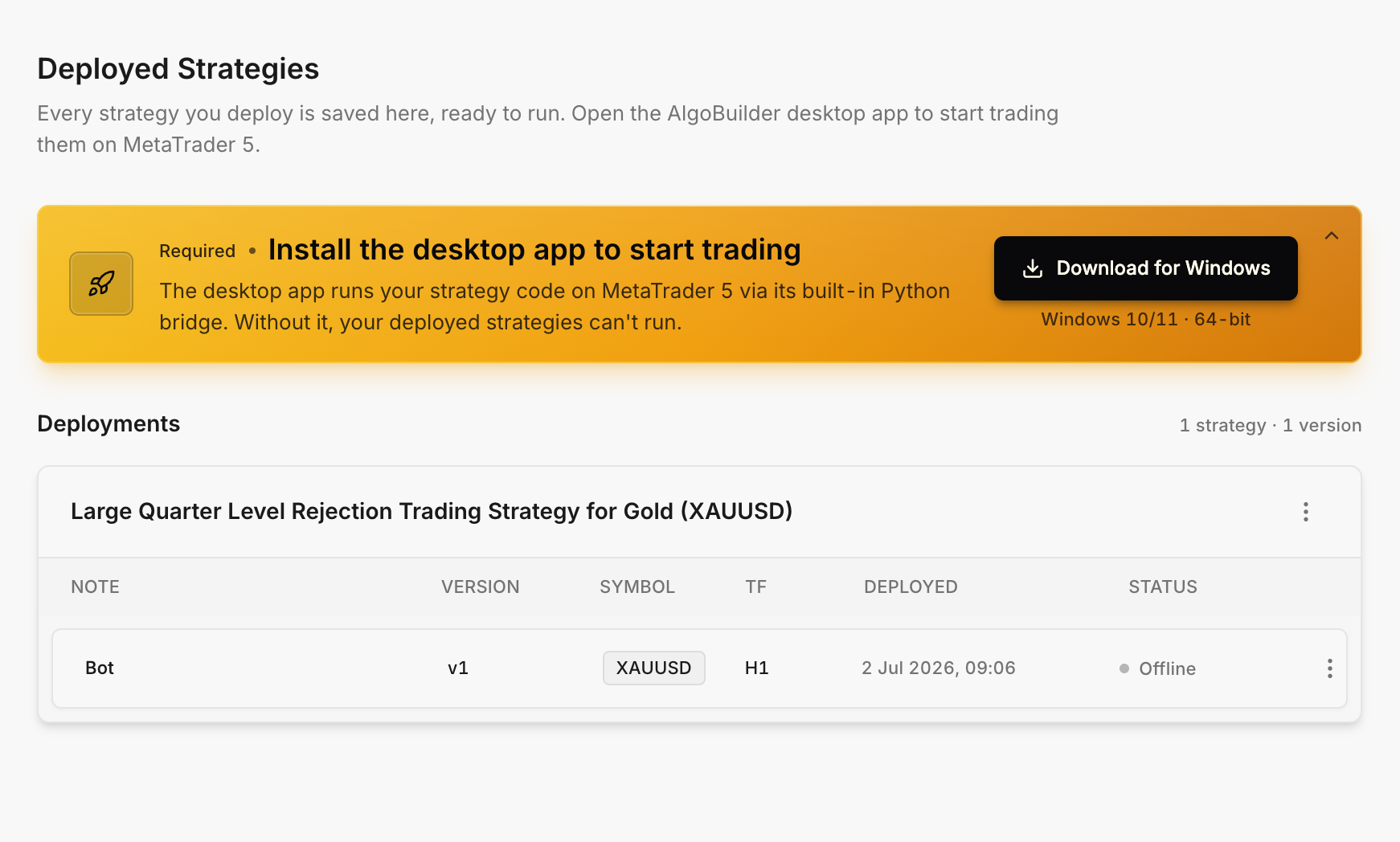
Before your bot can trade live, you'll need to install the AlgoBuilder desktop app, currently available for Windows 10/11, 64-bit. The desktop app runs your strategy code on MetaTrader 5 through its built-in Python bridge; without it, your deployed strategies stay offline and can't place trades.
Once installed, each deployment appears in a table showing its name, version, traded symbol, timeframe, and the date it was deployed, along with a live status indicator.
A strategy shows as “Offline” until the desktop app is running and connected; once it is, your bot goes live on your MetaTrader 5 account. From here, all that's left is to monitor your account and track your trades with our built-in application, TrackATrader.
Bonus Tips for Success with AI Trading Bots
Want to boost your odds of success? Monitoring key performance metrics, such as win rate, is crucial. Here are some tried-and-true tips:
1. Start Small and Scale Up
Begin with a demo account or a small real account. Let your bot prove itself before you increase the stakes. Gather data, track performance, and make informed decisions based on actual trading results.
2. Keep It Simple
Don’t overcomplicate your strategy. Simple, robust logic tends to perform better over time. Focus on repeatable patterns, clear entries/exits, and easy-to-follow risk management, including position sizing.
3. Monitor Performance
Even if it’s automated, check in regularly. Watch out for changing market conditions that might affect your bot’s logic. Regular reviews ensure your strategy stays relevant.
4. Backtest Often
Markets evolve. Periodically retest and refine your bot to keep it sharp. Use updated past data to test how your strategy holds up across volatility spikes, news events, and trend shifts.
5. Avoid the “Set and Forget” Trap
Bots are tools, not magic money machines. Be strategic, stay involved, and address any technical issues that may arise. Make adjustments, stay educated, and treat your bot like a business, not a slot machine.
In a Nutshell - How to Automate Your Trading with a Free AI Trading Bot
Here’s a quick summary on how you can automate your trading with Switch Markets' AI trading bot:
Let’s be real, manually trading is exhausting. But now, with AI and no-code tools like Algo Builder, you don’t need to spend years learning to program or hire developers.
If you’re interested in chasing financial freedom, passive income, or just want to stop missing trades while you sleep, building a trading bot has never been easier or cheaper.
With Switch Markets’ free AI trading bot builder, you can automate your trades, simplify your strategy, and take control of your time and more money.
To start, open your account, drop that $50, and start building your first bot today.
FAQs
Now that you know how to build and deploy your own trading bot, you probably have a few lingering questions. Let’s tackle the most common ones, including the role of algo trading in automated trading strategies, to make sure you’re fully equipped to get started with confidence.
Are AI trading bots profitable?
They can be if they are built well. The real edge comes from combining a solid strategy with proper risk management techniques.
How much does an AI trading bot cost?
Normally, most companies charge around $20-$150 per month for using an AI trading bot. With Switch Markets? Zero. Nada. Zilch. It’s completely free when you deposit just $50.
Are AI trading bots legit?
Yes, but it depends on the platform. Switch Markets is a reputable and regulated broker, and its Algo Builder is a secure tool integrated directly into your trading dashboard, utilizing the exchange API for seamless and reliable trading. You may want to avoid random bots from Telegram or YouTube with no proof or regulation.
How can you get a free AI trading bot?
Just open an account on Switch Markets and deposit $50. Once you do, you’ll instantly unlock the Algo Builder, which lets you build and run trading bots without coding for free, including paper trading simulations using API keys.
Risk Disclosure: The information provided in this article is not intended to give financial advice, recommend investments, guarantee profits, or shield you from losses. Our content is only for informational purposes and to help you understand the risks and complexity of these markets by providing objective analysis. Before trading, carefully consider your experience, financial goals, and risk tolerance. Trading involves significant potential for financial loss and isn't suitable for everyone.


